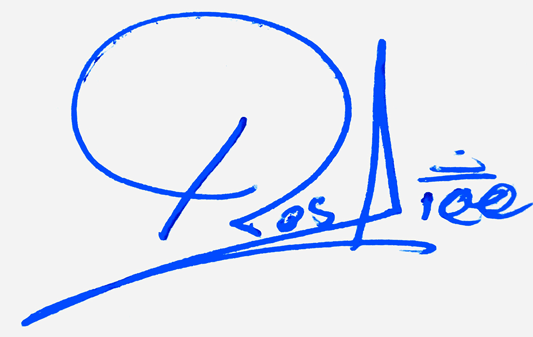
Initial-based signature tool for Your-Signature.com
Initials Signature Generator
Create compact initials signature designs, connected initials, and monogram-style marks. Enter 1 to 4 initials, change the design, and download a transparent PNG.
Use 1 to 4 letters. Example: TA, AK, MH, SA.
Advanced options
Create a stylish initials signature online from 1 to 4 letters. This free initials signature generator helps you preview connected initials, cursive initials, monogram-style marks, and short signature designs, then download your favorite version as a transparent PNG.
Create a Stylish Signature with Your Initials
An initials signature is a compact signature style made from the first letters of your name. It can look cleaner than a long full-name signature, especially when your name is long or when you want a short personal mark for quick signing, branding previews, or creative name designs.
This tool is made specifically for initials, not general logos. Type one, two, three, or four letters, switch between connected, cursive, minimal, bold, and monogram-style layouts, then download the design as a transparent initials signature PNG.
How to Use the Initials Signature Generator
- Type your initials in the box, such as TA, AK, MH, or SA.
- Choose an ink color such as blue, black, maroon, or gold-style ink.
- Use the Change Design button to preview different initials signature styles.
- Open all designs if you want to compare connected initials, monograms, and minimal marks.
- Choose a transparent or white background.
- Download your initials signature as a PNG image.
What Makes a Good Initial Signature?
A strong initials signature should be simple, balanced, and memorable. The letters should feel connected instead of looking like separate typed characters. A good initials design often uses one large letter, one supporting letter, a small underline, a loop, or a frame to create a mark that feels like a signature.
Connected Initials
Connected initials work well when two letters naturally flow together, such as TA, MA, AK, RA, SA, or MH. The goal is to make the letters look like one continuous personal mark instead of two separate letters.
Monogram Style
A monogram-style initials signature uses balance, spacing, and sometimes a circle or frame. It is useful for a compact, premium-looking mark, but it should still feel related to your handwritten identity.
Cursive Initials
Cursive initials use flowing strokes and calligraphy-style curves. They are good for elegant personal signatures, creative profile marks, and short stylish signature ideas.
Minimal Initial Marks
A minimal initials signature uses fewer strokes and less decoration. It is easier to repeat by hand and often works better for daily signing or fast writing.
Initials Signature vs Full Name Signature
A full-name signature is better when you want your name to be more recognizable. An initials signature is better when you want a short, compact, and fast signature. If your full name is long, initials can help you create a cleaner mark that is easier to fit in small spaces.
You can use an initials signature as your main short signature idea, or you can use it as a starting point before creating a full handwritten name signature.
Best Initial Signature Styles for Different Names
- Two initials: Use connected letters, overlap, or a simple underline.
- Three initials: Keep the middle letter smaller or use a monogram layout.
- One initial: Make the letter larger and add a loop, underline, or finishing stroke.
- Long names: Use initials to create a shorter personal mark.
- Professional marks: Use minimal or monogram-style initials with clear spacing.
Download Your Initial Signature as a Transparent PNG
A transparent PNG is useful when you want the initials signature to sit naturally on a light document, graphic, card, or preview without a white box behind it. You can also choose a white or soft paper background when you need a simple preview image.
Tips to Choose the Best Initial Signature Design
- Keep the first initial clear and confident.
- Avoid too many loops if you want to practice the design by hand.
- Use a frame only when it improves the balance of the letters.
- Try blue and black ink before choosing the final version.
- For two initials, test both connected and overlapped styles.
- For three or four initials, choose a cleaner layout so the mark does not look crowded.
Common Mistakes to Avoid
- Using too many decorative strokes around small initials.
- Choosing a design where the letters are no longer recognizable.
- Making all initials the same size when one letter should lead the design.
- Using a heavy frame with very thin letters.
- Choosing a design that looks good on screen but is too hard to write by hand.
Frequently Asked Questions
What is an initials signature generator?
An initials signature generator creates short signature designs from initials instead of a full name. It helps you preview connected initials, cursive initials, monogram layouts, and compact signature marks.
Can I use only one initial?
Yes. You can use one initial and add a loop, underline, or finishing stroke to make it feel more like a personal signature mark.
Can I use three or four initials?
Yes. The tool supports 1 to 4 initials. For three or four initials, cleaner layouts usually work better than very decorative styles.
Can I download my initials signature as a transparent PNG?
Yes. Choose a design and download it as a transparent PNG, or select a white or soft paper background if you want a simple preview image.
Is an initials signature better than a full-name signature?
It depends on your goal. Initials are better for a short, fast, compact signature. A full-name signature is better when readability and name recognition are more important.
Which initials style looks most professional?
Minimal connected initials or a clean monogram style usually look most professional. Keep the letters balanced and avoid too many decorative strokes.
Can I practice this initials signature by hand?
Yes. Choose a design that is simple enough to repeat, then practice it on paper until the letter shapes and connecting strokes feel natural.
Does this tool save my initials or signature?
The preview is created in your browser. You can generate and download your initials signature without uploading an image or creating an account.